
GEPCO Bill Check Online 2026
The Gujranwala region is one of the hardest working parts of Pakistan. Sialkot makes sports goods and surgical tools for the world, Gujranwala is full of small factories and workshops, and the farms of Hafizabad and Mandi Bahauddin feed the country. All of them run on electricity from GEPCO, the Gujranwala Electric Power Company. Whether you run a home, a shop or a small unit, a GEPCO bill check online lets you see your latest bill in seconds, without waiting for the paper copy or visiting an office.
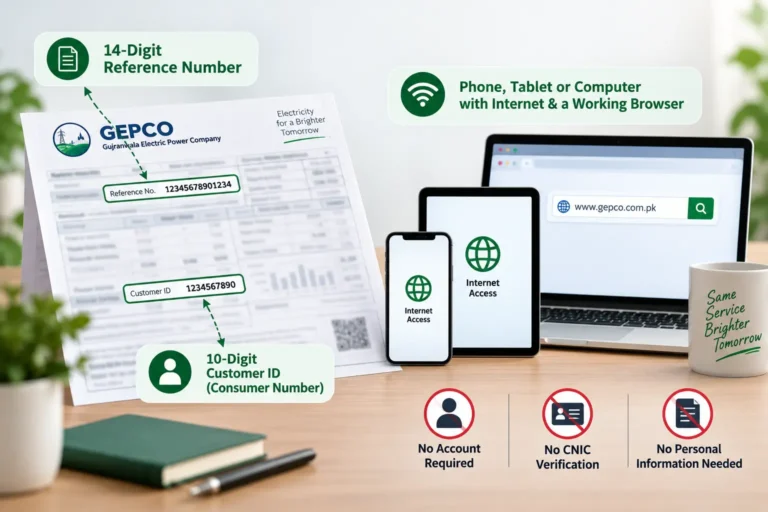
For a GEPCO bill check online, copy the 14 digit reference number from the top of any old GEPCO bill. Enter it in the GEPCO bill checker on this page, or on the official PITC portal at bill.pitc.com.pk with GEPCO selected, and press the check button. Your bill amount, due date, units used and full bill copy will appear. You can then save it as a PDF, print it, or pay it through your bank app, JazzCash or Easypaisa.
GEPCO Bill Check
Enter your Reference Number or Customer ID
Before You Start: What You Need
A GEPCO bill check online needs very little. You need a phone, tablet or computer with internet, and one number from your bill. That number is usually your 14 digit reference number, though some tools also accept your consumer ID. There is no sign up, no password and no fee.
If you want to save or print the bill, a browser that can save pages as PDF is enough. Every modern phone and computer can do this.

Three Ways to Do a GEPCO Bill Online Check
There is more than one way to reach your bill. The table below compares the three most common options so you can pick the one that suits you.
Method | What You Get | Best For |
GEPCO Bill Checker on This Page | Full bill view with amount, due date, units and history, ready to save or print | Quick checks on mobile, with no extra steps |
Official PITC Portal | The same full bill, after selecting GEPCO from the company list | People who prefer the government portal directly |
Bank App or Mobile Wallet | Payable amount and due date when you enter your reference number for payment | People who only want to know the amount and pay right away |
All three use the same official data from the GEPCO online billing system, which runs on the platform of the Power Information Technology Company (PITC). The amount will be the same whichever method you use.
Reference Number or Consumer ID
Your GEPCO bill has two identity numbers, and either can be used for a GEPCO bill check online on some tools. Here is a simple way to tell them apart.
Feature | Reference Number | Consumer ID |
Length | 14 digits | Shorter, varies by connection |
Where Printed | Top section of the bill | Near the reference number |
Works on Bill Checkers | Yes, on every platform | On some tools only |
Used for Payments | Yes, banks and wallets ask for it | Usually not |
Used for Complaints | Yes | Sometimes, along with the reference number |
GEPCO Bill Check by Reference Number
A GEPCO bill check by reference number is the safest choice because it works everywhere. The GEPCO bill reference number is not random. The first two digits are your billing batch, which sets the day your meter is read each month. The next five digits identify your subdivision office, and the last seven belong to your own connection. You may hear it called the GEPCO meter reference number, but it appears on the bill, not on the meter itself.
GEPCO Bill Check by Consumer ID
Some bill tools allow a GEPCO bill check by consumer ID. It is useful if you only noted down this number from a complaint slip or connection papers. If a GEPCO consumer ID check does not open your bill, switch to the reference number.
What If You Have Neither Number?
Look in the payment history of your bank app, JazzCash or Easypaisa. If you have paid even one GEPCO bill there, the reference number is saved. Old bank receipts also show it. Family members who paid the bill before may have it in their phones. If all else fails, call 118 or visit your GEPCO subdivision office with your CNIC and address, and the staff will look it up for free. Once you have it, save it in your phone so your next GEPCO bill check online takes seconds.
GEPCO Duplicate Bill: Download, Copy and Print
Once your GEPCO bill check online is complete, you can keep a copy in a few taps. A GEPCO duplicate bill is a fresh copy of your official bill. It carries the same reference number, amount, due date and barcode, so banks, wallets and payment counters treat it just like the original.
How to Save a GEPCO Electricity Bill Download PDF
On an Android phone, open your browser menu after the bill loads, tap Print or Share, and choose Save as PDF. On an iPhone, tap Share, then Print, and save the file to Files. On a computer, press Ctrl and P on Windows or Command and P on a Mac, then choose Save as PDF. Your GEPCO bill download is now ready to share on WhatsApp or keep as a GEPCO online bill copy.
GEPCO Bill Print at Home or at a Shop
To get a paper copy, choose your printer in the same print window. If you do not have a printer, many shops across Gujranwala, Sialkot and Gujrat offer a GEPCO bill printing service. To keep your details safe, give them your saved PDF to print instead of reading out your reference number, and ask them to delete the file after printing. Either way, your GEPCO bill print looks exactly like the original.
When a GEPCO Duplicate Bill Download Helps
A recent bill is often needed for bank accounts, school admissions, rent agreements, new connections, load extensions and solar applications. Shop owners and small factories also need bills for business records and tax files. Keeping a GEPCO duplicate bill download on your phone saves you from last minute rushing.
Understanding Your GEPCO Electricity Bill
A GEPCO electricity bill has many boxes, but you only need to understand a few of them well. Once your GEPCO bill check online is done, use this table to find and check each important box.
Box on the Bill | What It Shows | What to Check |
Tariff | Your connection type, such as domestic, commercial, industrial or agricultural | It matches how you actually use the connection |
Sanctioned Load | The power your connection is approved to use | You are not regularly using far more than this |
Previous and Present Reading | Meter readings at the last and current reading dates | The present reading is close to your meter |
Units Consumed | Electricity used this month | Similar to the same month last year |
Bill History | Units and payments for 12 months | No sudden unexplained jumps |
Arrears | Unpaid amounts from past months | Zero if you paid on time |
Due Date | Last day to pay without surcharge | Pay before this date |

GEPCO Electricity Charges Explained
The charges section shows where your money goes. Here are the common lines in simple words.
Charge | Simple Meaning |
Cost of Electricity | The price of your units, based on your slab |
Fixed Charges | A monthly charge based on your usage category under the 2026 structure |
FPA | Fuel Price Adjustment, which changes with fuel costs and is set by NEPRA |
QTA | Quarterly Tariff Adjustment from regular tariff reviews |
FC Surcharge | A surcharge used to pay back power sector debt |
Electricity Duty | A provincial duty on electricity use |
GST | General sales tax |
Income Tax | Applies in some cases, such as commercial connections or larger bills |
Fixed Charges and Adjustments
GEPCO does not set its own prices. Rates are decided by NEPRA and the federal government and apply the same way across government owned distribution companies.
The Protected Slab
Homes that use 200 units or less each month count as protected and pay much lower rates. Your usage over the past six months decides your category. Crossing 200 units, even once, can move you to higher non protected rates for months afterward. In the Gujranwala region, summer and the wedding season are the usual times when families cross this line.
Fixed Charges in 2026
In February 2026, NEPRA approved fixed monthly charges for domestic consumers, including protected users. Under the reported structure, protected users pay Rs200 for up to 100 units and Rs300 for up to 200 units, while other homes pay amounts that rise with usage up to Rs675. Lifeline consumers remain exempt.
FPA and QTA
These adjustments can change your GEPCO monthly bill even if your units stay the same. A regular GEPCO bill check online helps you notice them. When the total looks odd but your units look normal, check these lines first.
Good to Know: Per unit rates change after NEPRA decisions and government notifications. For the exact current rates, check the tariff section on the NEPRA website or the rates printed on your own GEPCO bill.
Know Your Billing Rights
A GEPCO bill check online shows you the charges, but knowing your rights helps you question them. Most bill guides never mention this, but your rights as a customer are written down in official rules. NEPRA publishes a Consumer Service Manual that every distribution company, including GEPCO, must follow. Knowing a few key points can save you money.
One important rule covers slow meters. When a meter is found to be running slow, a company cannot simply charge you for an unlimited period of past use. In September 2025, NEPRA fined GEPCO Rs200 million for breaking provisions of the Consumer Service Manual, and ordered refunds for 1,298 consumers who had been charged beyond two billing cycles for slow meters. This shows that the regulator takes these rules seriously and that overcharges can be reversed.
The manual also covers sanctioned load. If you regularly use more power than your connection allows, the company should first send you a notice asking you to apply for a load extension within a set time, before taking stronger action. If you receive such a notice, apply quickly to avoid trouble.
GEPCO has also improved its meter service. According to the Ministry of Energy, defective electricity meters in the GEPCO region are now being replaced within one month. If your meter is faulty and has not been replaced in that time, mention this when you complain.
When your bill appears on the screen, most portal sites allow you to download it as a PDF or print it out immediately. A copy of the bill like this is known as a duplicate bill and has the same official details as your original paper bill, which is acceptable as proof of payment at banks, ATMs, and mobile wallets.
It is particularly useful to download a copy when you need evidence of payment for a rented property, for a business expense record, or just in case the paper copy gets damaged or lost.
GEPCO Electricity Bill Verification in 5 Minutes
A short monthly check protects you from paying for mistakes. After your GEPCO bill check online, do this simple GEPCO electricity bill verification. First, confirm your name, address and tariff. Second, walk to your meter and compare its reading with the present reading on the bill. Third, compare your units with the same month last year. Fourth, check that there are no arrears if you paid on time. Fifth, look for any estimated reading or detection charge you did not expect. If something looks wrong, take a clear, dated photo of your meter before the next reading.
GEPCO Bill Correction: Where to Go
GEPCO bill correction works best when you start early and carry proof. An early GEPCO bill check online gives you time to act before the due date.
Call 118 or Send an SMS to 8118
The national 118 helpline handles complaints for all government owned distribution companies, including GEPCO. According to the Ministry of Energy, it accepts complaints in seven languages, lets you track them, and moves unsolved complaints up to senior officers automatically. You can also send a complaint by SMS to 8118. Always write down your complaint number.
Visit Your Subdivision Office
For billing errors, visit the revenue section or customer services desk at your subdivision office. Take your bill, CNIC, dated meter photos and any receipts. Ask for a corrected bill, or for a written reply explaining the charge.
Escalate to NEPRA
If GEPCO does not solve the issue in a reasonable time, you can file a complaint with NEPRA through its official website, or use the Pakistan Citizen Portal. Attach your GEPCO complaint number and proof.
GEPCO Online Bill Payment
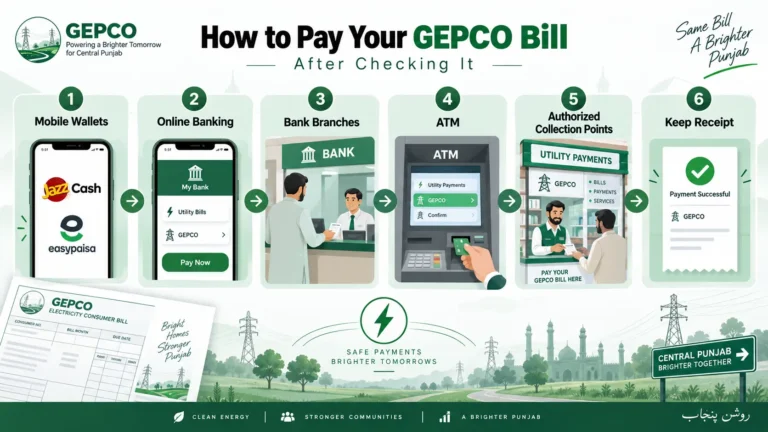
After your GEPCO bill check online, paying takes just a minute. Every method below asks only for your reference number.
GEPCO Bill Payment Methods | How It Works |
Bank Mobile App | Choose bill payments, then electricity, then GEPCO, and enter your reference number |
JazzCash and Easypaisa | Use the utility bills menu, select GEPCO, and enter your reference number |
Internet Banking | Use the utility bill option on your bank website |
ATM | Use the bill payment menu with your debit card |
Bank Branch or Post Office | Pay in cash with your paper or printed duplicate bill |
Save your receipt or transaction ID every time. The online bill may take a few days to show your payment. If it does not appear after about a week, show your receipt at your subdivision office.
GEPCO customers have a strong record of paying on time. According to the Ministry of Energy, GEPCO closed the 2025 to 2026 financial year with a recovery rate above 100 percent, along with line losses of 9.80 percent, down from 10.43 percent the year before. That makes GEPCO one of the better performing companies in the country.
Will GEPCO Privatization Change Your Bill?
GEPCO is part of the government plan to privatize some electricity distribution companies. According to news reports in October 2026, a group of Pakistani companies has submitted interest in buying a controlling stake, and the government aims to complete the sale by early 2027.
Here is what this means for you today. Nothing about your bill has changed yet. Your reference number, the GEPCO bill checker and the payment methods all work as before. Electricity rates are still set by NEPRA and the government, not by the company alone. If the sale goes ahead, any change to billing systems or contact numbers should be announced officially, and we will update this page when that happens.
GEPCO Customer Services and Contacts
GEPCO customer services can be reached through these channels.
Service | Details |
Complaint Helpline | 118, available around the clock in seven languages |
SMS Complaints | Send your complaint to 8118 |
Online Bill | bill.pitc.com.pk or the GEPCO bill checker on this page |
Official Website | gepco.com.pk |
Head Office | 565-A Model Town, G.T. Road, Gujranwala |
Local Help | Your subdivision office, printed on your bill |
Districts Served by GEPCO
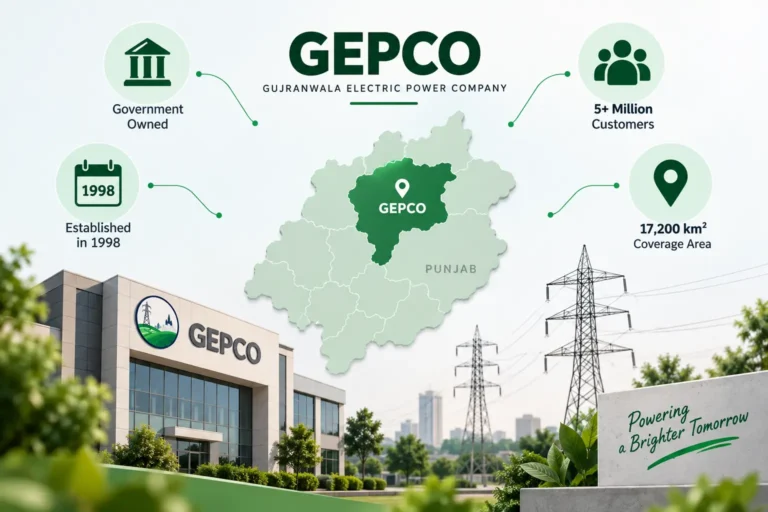
GEPCO supplies electricity to Gujranwala, Sialkot, Narowal, Gujrat, Hafizabad and Mandi Bahauddin, including the newer Wazirabad district. According to the Privatisation Commission, GEPCO serves about 5.1 million consumers across around 17,200 square kilometers.