HESCO Bill Check Online in Pakistan 2026
Summer in southern Sindh is tough. When the temperature climbs past 45 degrees, fans, coolers and air conditioners run almost all day, and the electricity bill that follows can be a shock. That is exactly why it pays to see your bill early. A HESCO bill check online shows your full bill on your phone in a few seconds, so you know the amount and the due date long before the paper copy reaches your door.
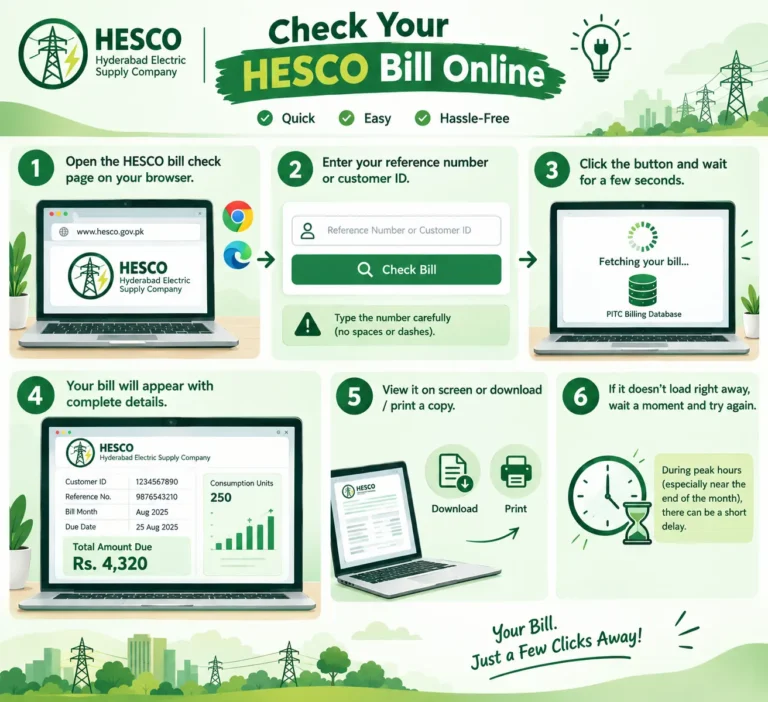
For a HESCO bill check online, copy the 14 digit reference number from the top of any old HESCO bill. Enter it in the HESCO bill checker on this page, or on the official PITC portal at bill.pitc.com.pk with HESCO selected, and press the check button. Your bill amount, due date, units used and full bill copy will appear. You can then save it as a PDF, print it, or pay it through your bank app, JazzCash or Easypaisa.
HESCO Bill Check
Enter your Reference Number or Customer ID
What Is HESCO?
HESCO stands for Hyderabad Electric Supply Company. It was formed in 1998 from the old Area Electricity Board Hyderabad, when the power wing of WAPDA was split into separate distribution companies. Today it supplies electricity to the southern districts of Sindh, except Karachi.
Detail | Information |
Full Name | Hyderabad Electric Supply Company (HESCO) |
Formed | 1998, from the former Area Electricity Board Hyderabad |
Head Office | Hyderabad, Sindh |
Service Area | 13 districts across the Hyderabad, Mirpurkhas and Shaheed Benazirabad divisions |
Example Districts | Hyderabad, Jamshoro, Matiari, Tando Allahyar, Tando Muhammad Khan, Badin, Thatta, Sujawal, Mirpurkhas, Umerkot, Tharparkar, Sanghar and Shaheed Benazirabad |
Regulator | National Electric Power Regulatory Authority (NEPRA) |
Billing System | The HESCO online billing system runs on the platform of the Power Information Technology Company (PITC) |
Official Website | hesco.gov.pk |
HESCO covers a wide mix of places, from busy city areas like Latifabad and Qasimabad to farming towns, coastal areas and the desert villages of Tharparkar. Wherever you live in this region, the HESCO bill check online works exactly the same way.

How to Do a HESCO Bill Check Online
The HESCO bill checker at the top of this page is free and works on any phone or computer. You do not need to create an account.
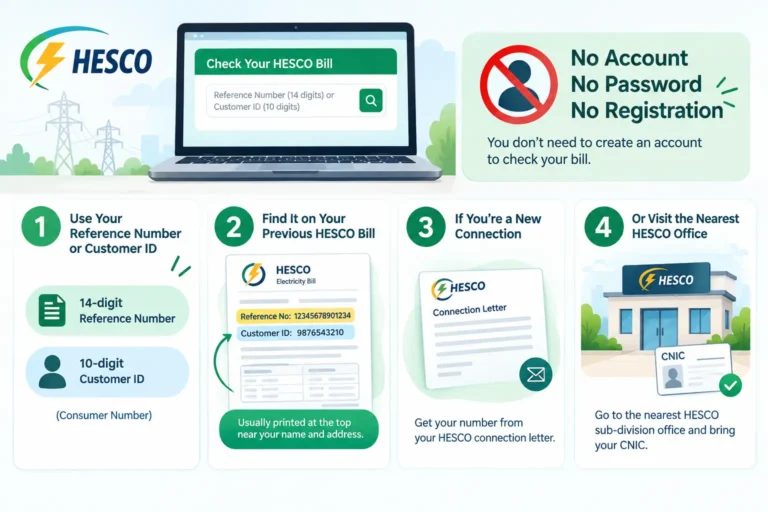
- Take any old HESCO bill and find the 14 digit reference number in the top section.
- Type the number into the HESCO bill checker using digits only, without spaces or dashes.
- Press the check button and wait a few seconds.
- Your HESCO online bill appears in the same layout as the paper bill.
We display the bill exactly as it comes from the official PITC record that HESCO uses, so the amount after your HESCO bill check online matches the amount HESCO has billed.
Tips for a Smooth First Check
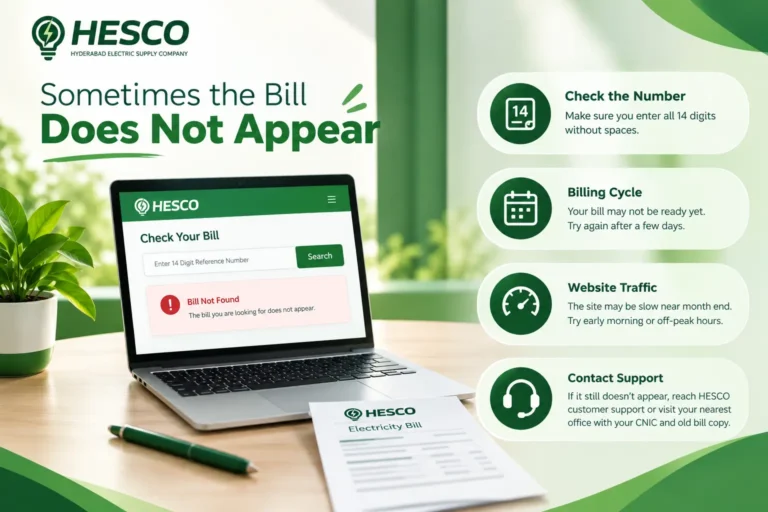
Read the reference number slowly from the bill, because a single wrong digit returns nothing. If you are on the PITC portal, choose HESCO from the company list before searching. If your bill was printed with spaces between groups of digits, leave those spaces out when typing. And if you still see last month, wait a day or two, since new bills appear online a few days after the meter is read.
What the Bill Screen Shows
Once the bill opens, a HESCO current bill check takes one look. You will see the payable amount, the HESCO bill due date, the HESCO electricity units consumed, your tariff, any arrears and a 12 month history. This makes a HESCO bill amount check and a comparison with last year quick and simple, and turns every HESCO bill inquiry into a one minute job.
| Identifier | Where to Find It | Typical Format |
|---|---|---|
| Reference Number | Printed at the top of your previous electricity bill | 14-digit number |
| Customer ID | Available on the bill, also called the consumer number | 10-digit number |
HESCO, SEPCO or K-Electric: Which Company Bills You?
Sindh has three electricity companies, and choosing the wrong one is a common reason a HESCO bill check online fails. Check the company name at the top of your bill, or use this simple guide.
Company | Full Name | Main Areas |
HESCO | Hyderabad Electric Supply Company | Southern Sindh outside Karachi, including the Hyderabad, Mirpurkhas and Shaheed Benazirabad divisions |
SEPCO | Sukkur Electric Power Company | Upper Sindh, including Sukkur and Larkana |
K-Electric | K-Electric Limited, a private company | Karachi and some nearby areas |
If your bill says SEPCO or K-Electric, use the checker for that company instead. K-Electric also uses a 13 digit account number rather than the 14 digit reference number used by HESCO.
The Numbers You Need on Your HESCO Bill
HESCO Bill Check by Reference Number
The HESCO bill reference number is the 14 digit number printed near the top of your bill. A HESCO bill check by reference number works on every platform, including this page, the PITC portal, banks and mobile wallets. It is the number HESCO staff ask for first whenever you need help.
The digits are arranged in a simple way. The first two show your billing batch, which sets the date your meter is read each month. The next five point to your subdivision office, and the last seven belong to your own connection. People sometimes call it the HESCO meter reference number, but it is printed on the bill and not on the meter.
HESCO Bill Check by Consumer ID
Your bill also carries a consumer ID, which is a shorter number linked to your connection. Some tools allow a HESCO bill check by consumer ID, which helps when that is the only number you have saved. If a HESCO consumer ID check does not open your bill, switch to the reference number.
If You Cannot Find Any Old Bill
Look in your bank app, JazzCash or Easypaisa payment history, where the reference number is usually saved after a payment. Ask family members or your landlord for a photo of any old bill. If none of these work, call 118 or visit your HESCO subdivision office with your CNIC and address, and the staff will find your number at no cost. Once you have it, save it in your phone so every future HESCO bill check online takes seconds.
HESCO Duplicate Bill: Three Ways to Keep a Copy
After your HESCO bill check online, you can keep a copy of the bill in whatever form suits you. A HESCO duplicate bill has the same reference number, amount, due date and barcode as the original, so banks and counters accept it.
1. Save a HESCO Electricity Bill Download PDF
This is the best option for most people. On Android, open the browser menu, tap Print or Share, and choose Save as PDF. On an iPhone, tap Share, then Print, and save the file to Files. On a computer, press Ctrl and P on Windows or Command and P on a Mac, then choose Save as PDF. Your HESCO bill download becomes a clean HESCO online bill copy you can share on WhatsApp or email.
2. Get a HESCO Bill Print
Choose your printer in the same print window to get a paper copy. If you do not have a printer, shops in Hyderabad, Mirpurkhas, Nawabshah and other towns offer a HESCO bill printing service. Give them your saved PDF to print, and ask them to delete it afterward, so your details stay private. A HESCO bill print looks the same as the bill delivered to your home.
3. Keep It on Your Phone
Keep your latest HESCO duplicate bill download in a folder on your phone. It comes in handy for bank accounts, school admissions, rent agreements, new connections, load extensions and solar applications. Many families also send a copy to relatives who help with payments from other cities or abroad.
Understanding Your HESCO Electricity Bill
After your HESCO bill check online, take a few minutes to read the bill properly. A HESCO electricity bill has many boxes and short codes. Instead of explaining every line, the table below tells you what to look for and what it means in plain words.
If You See This on Your Bill | What It Means |
Units Consumed | The electricity you used this month, found by subtracting the previous reading from the present reading |
Payable Within Due Date | The amount to pay if you pay on time |
Payable After Due Date | The higher amount that includes a late payment surcharge |
Arrears | Money left unpaid from earlier months |
Detection Units or Detection Amount | Extra units charged because HESCO believes electricity was used but not recorded |
Estimated or Defective Meter Code | Your bill is based on an estimate, not an actual reading |
Fixed Charges | A monthly charge based on your usage category, under the 2026 structure |
FPA | Fuel Price Adjustment, set by NEPRA, which can go up or down |
QTA | Quarterly Tariff Adjustment from regular tariff reviews |
FC Surcharge, Electricity Duty and GST | Surcharges, provincial duty and sales tax added to the bill |
Bill History | Your units and payments for the last 12 months |
The bill history is the most useful part for spotting problems. Compare this month with the same month last year. If the units are far higher and nothing at home has changed, it is time to look more closely.
Detection Bills: What They Are and What You Can Do
For many HESCO customers, the most worrying line on a bill is a detection charge. A detection bill adds extra units to your account because the company believes electricity was used but not properly recorded, often because of suspected theft, a tampered meter, or a meter that was not working.
This is not a small issue in the HESCO region. In 2024, Dawn reported that HESCO charged 132 million detection units in June that year against about 185,000 consumers, roughly 40 million more units than in June 2023, and that NEPRA was looking into unusually high detection bills from some distribution companies. Many honest customers felt these charges were unfair.
If your HESCO bill check online shows detection units you do not understand, do not ignore them and do not panic. Follow these steps:
- Ask your subdivision office for the detection details in writing, including how many units were charged, for which months, and the reason.
- Check whether you were informed or your meter was inspected before the charge was added. NEPRA rules in its Consumer Service Manual set out the procedure companies must follow.
- Take clear, dated photos of your meter and keep all your old bills and payment receipts.
- File a written complaint with HESCO, and keep the complaint number.
- If the matter is not resolved, take it to NEPRA through its official website, attaching all your documents.
Customers who ask for the details in writing and keep proper records are in a much stronger position to get unfair detection charges reduced or removed.
HESCO Electricity Charges in 2026
HESCO does not set its own prices. Rates are decided by NEPRA and the federal government and apply in the same way across government owned distribution companies.
The 200 Unit Rule
Homes that use 200 units or less each month count as protected customers and pay much lower rates. Your category depends on your usage over the past six months. In the heat of a Sindh summer, many families cross 200 units without noticing, and that can move them to higher rates for months afterward.
Fixed Charges
In February 2026, NEPRA approved fixed monthly charges for domestic consumers, including protected users. Under the reported structure, protected users pay Rs200 for up to 100 units and Rs300 for up to 200 units, while other homes pay amounts that rise with usage up to Rs675. Lifeline consumers remain exempt.
Monthly and Quarterly Adjustments
The FPA and QTA can change your HESCO monthly bill even if your units stay the same. A regular HESCO bill check online helps you notice these changes early.
Paying on Time Helps Your Whole Neighborhood
HESCO manages load shedding by feeder, which is the line that supplies your area. Feeders with high losses from theft and unpaid bills can face longer cuts, while feeders with good recovery can be made free of load shedding. According to APP, HESCO had declared 66 feeders free of load shedding by the end of June 2026, including feeders in Hyderabad, Jamshoro and Shaheed Benazirabad districts. Paying your bill on time is a small step that helps your feeder join that list.
HESCO Electricity Bill Verification
A quick monthly check after your HESCO bill check online can save you money. Use this HESCO electricity bill verification list:
- Your name, address and tariff are correct.
- The present reading on the bill is close to the reading on your meter.
- Your units are similar to the same month last year.
- There are no detection units unless you were told about them.
- There are no arrears if you paid last month on time.
If anything looks wrong, photograph your meter with the date visible and keep your receipts together.
HESCO Bill Correction: How to Get Help
HESCO bill correction is easiest when you act before the due date and carry proof.
Call 118 or Send an SMS to 8118
The national 118 helpline handles complaints for all government owned distribution companies, including HESCO. According to the Ministry of Energy, you can lodge complaints in seven languages, including Sindhi and Urdu, track their progress, and complaints that are not solved in time move up to senior officers automatically. You can also send a complaint by SMS to 8118. Always note down your complaint number.
Visit Your Subdivision Office
For billing problems, go to the revenue section or customer services desk at your subdivision office. Take your bill, CNIC, dated meter photos and payment receipts. Ask for a corrected bill or a written reply.
Escalate if Needed
If HESCO does not fix the problem in a reasonable time, you can complain to NEPRA on its official website or use the Pakistan Citizen Portal. Include your HESCO complaint number and all your proof.
The best way to find out whether your area is served by HESCO or by another distribution company is to check the name of the company printed on your latest electricity bill or to enquire at your local HESCO sub-division office.
HESCO Online Bill Payment
After your HESCO bill check online, HESCO online bill payment takes just a minute. Each method below needs only your reference number.
HESCO Bill Payment Methods | How It Works | Helpful Tip |
Bank Mobile App | Choose bill payments, then electricity, then HESCO, and enter your reference number | Save HESCO as a payee for next month |
JazzCash | Use the bill payment menu, choose electricity and HESCO | Screenshot the transaction ID |
Easypaisa | Use the bills menu, choose electricity and HESCO | Agent shops in most towns accept payments too |
Internet Banking | Use the utility bill option on your bank website | Easy to review the full bill on a large screen |
Bank Branch or Post Office | Pay in cash with your paper or printed duplicate bill | Avoid the last day, when lines are long |
Your online bill may take a few days to show a payment. If it does not appear after about a week, take your receipt to your subdivision office.
HESCO Customer Services and Contacts
HESCO customer services are available through these channels.
Service | Details |
Complaint Helpline | 118, available around the clock in seven languages, including Sindhi |
SMS Complaints | Send your complaint to 8118 |
Online Bill | bill.pitc.com.pk or the HESCO bill checker on this page |
Official Website | hesco.gov.pk |
Local Help | Your subdivision office, printed on your bill |
Final Thoughts
A HESCO bill check online puts your bill in your hands, even in the hottest months when every unit counts. It helps you pay on time, keep a duplicate copy ready, spot wrong readings and detection charges early, and act before the due date. Save your reference number in your phone and use the HESCO bill checker at the top of this page every month.